1/5
Efficient and cost-effective rendering pipelines with Blender and AWS Batch
This blog post explores how visual effects rendering, a computationally intensive task, can be performed efficiently and cost-effectively using AWS Batch and AWS Step Functions. Rendering, the process of generating 2D or 3D images from models, is widely used in video game design, visual effects, and animated movie compositing. The article details a method for parallelizing rendering workloads and producing animations, leveraging AWS Batch for managing rendering jobs on Amazon EC2, and AWS Step Functions for coordinating the workflow's dependencies. A significant advantage highlighted is the use of Amazon EC2 Spot Instances, which can reduce compute costs by up to 90% compared to On-Demand prices.
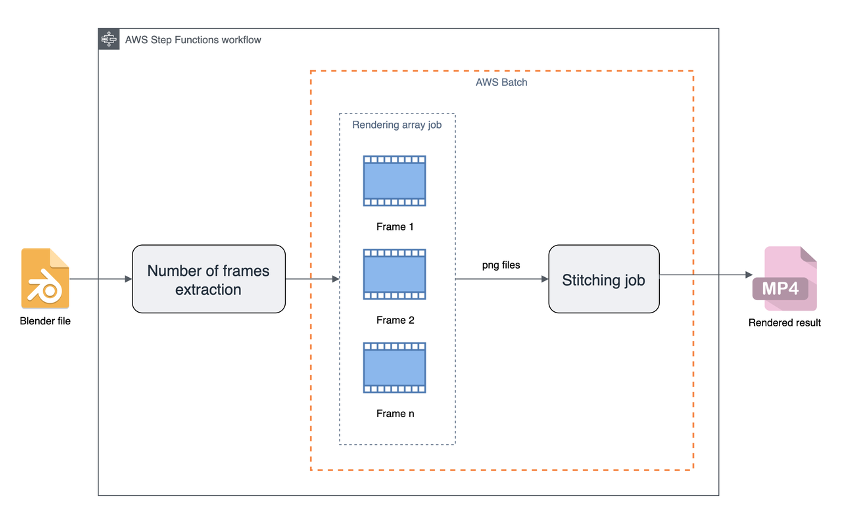
The core principle of the proposed rendering pipeline relies on the parallelizable nature of rendering: each frame of an animation can be processed independently. This characteristic makes it ideal for AWS Batch, which provides fully managed batch processing and dynamically provisions compute resources. Blender, an open-source 3D creation suite, is presented as a suitable tool for this pipeline, although AWS Thinkbox Deadline is mentioned for professional VFX teams. By rendering individual frames as separate tasks, AWS Batch can launch numerous jobs concurrently, significantly speeding up the rendering process. The workflow comprises three main stages: extracting the number of frames from a Blender file using an AWS Lambda function and the Blender Python library, submitting a rendering array job where each child job renders a single frame, and finally, stitching these rendered frames into a complete MP4 video. The independence of frame rendering jobs also allows for efficient retry mechanisms in case of failures.
The article provides detailed guidance on configuring compute environments in AWS Batch. It differentiates between On-Demand and Spot Compute Environments (CEs), explaining their optimal use cases. On-Demand CEs, with a `BEST_FIT_PROGRESSIVE` allocation strategy, are recommended for critical, serial tasks like video stitching, where uninterrupted processing is crucial. Spot CEs, utilizing `SPOT_CAPACITY_OPTIMIZED` strategy, are advocated for the parallelizable rendering tasks due to their cost-effectiveness, despite the possibility of interruptions. The configuration examples using AWS Command Line Interface (CLI) demonstrate how to set up these environments, including specifying instance types, vCPU limits, and subnets. The post also explains how to combine these different CEs into a single job queue with varying priorities, allowing for a balanced approach where high-priority tasks use On-Demand instances and less critical, but more numerous, tasks leverage the cost savings of Spot Instances.
AWS Step Functions is introduced as the orchestration tool for the rendering pipeline. Its low-code, visual workflow service integrates seamlessly with AWS Batch through optimized integrations. The state machine defined in AWS Step Functions manages the entire process, from extracting frame counts to submitting rendering jobs and initiating the final stitching. A key feature discussed is the ability to configure job retries within AWS Step Functions and AWS Batch. This retry mechanism is particularly beneficial when using Spot Instances, as it allows jobs to automatically restart if an instance is interrupted, ensuring the overall workflow's completion without manual intervention. The post concludes by emphasizing the benefits of this integrated approach in achieving efficient and cost-effective rendering pipelines and refers readers to a workshop for hands-on experience.
#AWSBatch #AWSStepFunctions #BlenderRendering #CostEffectiveCloud #HPC #SpotInstances #VFXPipeline #CloudComputing #WorkflowOrchestration #AWSBatch #AWSStepFunctions #BlenderRendering #CostEffectiveCloud #HPC #SpotInstances #VFXPipeline #CloudComputing #WorkflowOrchestration
0 comment in total
 No comments yet
You may also like
Remote Rendering for Real-time AR Applications at AWS Edge

Top 10 3D Rendering Companies in India You Should Know About

3D Gaussian Splatting: Performant 3D Scene Reconstruction at Scale

3d rendering architecture design
Best 3D modeling software of 2025


3D Architectural Rendering Services at Unbeatable Price / Cost

How AI-Powered Rendering Crushes Bottlenecks in Architecture and Interior Design