1/11
Your Wi-Fi Router Is Ugly. Here’s How to Hide It Without Blocking Your Signal. | Reviews by Wirecutter
Many Wi-Fi routers are considered aesthetically unappealing, leading individuals to attempt to conceal them. However, certain materials like brick and metal can obstruct Wi-Fi signals, undermining the router's functionality. This article investigates various router-disguising methods to determine which ones maintain a strong signal while enhancing home aesthetics. The testing methodology involved evaluating the router's signal strength within different containers, particularly focusing on connectivity to a laptop located over 50 feet away in an attached garage, through multiple walls.
Optimal router placement is crucial for effective Wi-Fi coverage. It is recommended to position the router in a central location within the home. Placing it near an exterior wall can result in a strong signal at one end of the house but a weaker signal at the opposite end. Wi-Fi signals emanate spherically, making a central placement most efficient. Even with a mesh network, the main router and modem should be centrally located, with mesh extenders radiating outwards. Routers should not be placed on the floor, as furniture, appliances, electrical wiring, and people can obstruct the signal. Furthermore, routers require proper ventilation to prevent overheating, which can lead to slowdowns. Therefore, cramped cabinets are unsuitable for router placement.
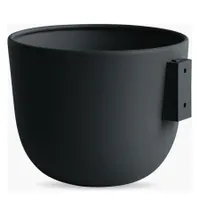
Several aesthetically pleasing and functional options for hiding routers were tested. A sleek, modern crate, specifically a Hay Recycled Colour Crate, proved effective. This crate provided ample space for both a router and a cable modem, with handles facilitating wire management. Its vented sides and open top ensured excellent ventilation. The recycled polypropylene material of the crate had minimal impact on Wi-Fi signals, allowing for smooth 4K video streaming and fast downloads throughout the test home. Although the router's antennas were slightly visible through the crate's handles, it effectively concealed the device.
A rustic wicker basket also performed well. A large Target laundry basket was tested, easily accommodating a router and modem. Its height effectively camouflaged the router, and wires could be threaded through its weave. The wicker material had minimal to no effect on Wi-Fi signals. To maintain proper ventilation, it is advised to avoid placing anything on top of the basket, such as fabric or books.
A lidded bamboo box, such as the IKEA Smarra, was another option. While aesthetically pleasing and fitting the router well, it required cutting a hole for wires due to its stiff weave. This box might be too snug for both a router and a larger modem. The enclosed nature of the box did show a slight performance degradation during high-traffic scenarios, suggesting potential overheating, though the slowdown was minor and likely unnoticeable in everyday use.
Conversely, metal containers were found to be detrimental to Wi-Fi signals. A Target Brightroom Metal Mesh Bin, while accommodating a router, did not effectively hide it due to its transparent mesh. More significantly, the metal mesh degraded Wi-Fi signals to distant laptops, turning weaker signal zones into dead zones, particularly in the garage and living room during busy network activity. Similarly, the IKEA Växthus basket, despite its plastic rattan weave, had a metal frame that severely impacted Wi-Fi connectivity. It blocked almost all signal to the garage, creating a dead zone, and measurably affected other tests on a busy network. This metal-framed basket was deemed the least effective option among those tested.
In conclusion, the location of a router is the most critical factor for a strong Wi-Fi signal. While disguising an unsightly router is understandable, it is imperative to avoid materials like metal, which can significantly block signals. Wood or plastic containers with adequate ventilation are recommended for hiding routers without compromising performance. Proper airflow is essential to prevent overheating and maintain optimal router function.
#WiFiRouter #HomeDecor #SignalStrength #WirelessNetworking #InteriorDesign #TechTips #HomeImprovement #RouterPlacement #Ventilation #WiFiRouter #HomeDecor #SignalStrength #WirelessNetworking #InteriorDesign #TechTips #HomeImprovement #RouterPlacement #Ventilation
0 comment in total
 No comments yet
You may also like
Here's How to Hide Your Ugly TV Cables and Wires

Is Your Soundbar Ruining Your Living Room’s Aesthetic? Here’s How to Conceal It Like a Designer

How to Hide Outdoor Lighting Wires and Cables — 7 Tips for a Patio Free From Circuitry Eyesores

5 Ways to Hide Your Outdoor AC Unit So It Blends In Beautifully, According to Designers

12 Best Ways To Hide Your Washing Machine Hookups

How to hide an ugly extractor fan for a sleek and stylish kitchen
This Genius DIY Is the Ultimate Hack for Hiding "Ugly" Spaces
How to Hide an Air Fryer in a Kitchen — 6 Practical Solutions to Conceal Bulky Appliances From Sight

24 Ways to Hide Your TV in Plain Sight

10 Clever Ways to Hide a TV in Plain Sight

How to hide TV wires – 5 ways to eliminate messy cords from your living room for a clean and seamless look
Creative ways to hide TV cords on walls
Wi-Fi Technicians Reveal the 5 Worst Spots to Place Your Router

5 ways to hide plug sockets in your kitchen for a seamless and uncluttered look
Stylish Ways To Hide Your Ugly Radiator And Other Common Household Eyesores

'My neighbor's built an unsightly wall, how can I hide it?' 5 ideas that will turn an eyesore into your backyard's best feature
This Is the Ultimate Way to Hide Your TV

8 stylish ways to hide your TV around your home
How to Hide an Air Fryer in a Kitchen — 6 Practical Solutions to Conceal Bulky Appliances From Sight
7 Clever Ways to Hide TV Cords